Digital Back to School Canva Templates: Streamline Your Year
The back-to-school season is often a frantic rush of supply lists, schedule juggling, and last-minute organization. For parents, educators, and small business owners in the education niche, staying ahead of the chaos requires more than just a pen and paper—it requires a system. Enter the Digital Back to School Canva Templates. This comprehensive collection isn't just a set of pretty pages; it is a fully integrated digital planning ecosystem designed to bring order to the academic year. Whether you are managing a household, running a tutoring business, or planning a classroom curriculum, these templates offer a polished, professional solution that is both functional and visually appealing.
A Deep Dive into the Ultimate Academic Organizer
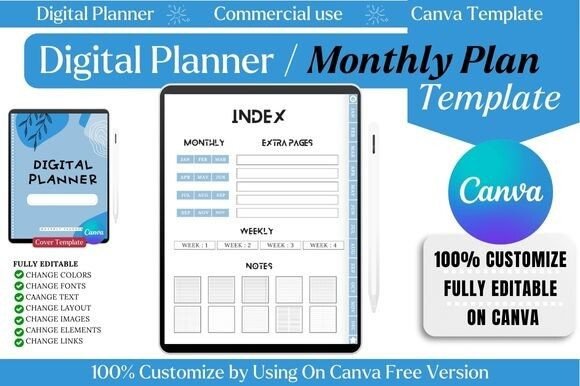
What sets this collection apart in the crowded market of digital planning tools is its sheer volume and versatility. The package includes high-quality, print-ready PDF files and JPEG files, but the real magic lies in the editable Canva links. This allows you to function not just as a user, but as the designer of your own organizational system. The visual personality of these templates is clean, modern, and structured. It avoids the clutter of traditional planners, utilizing a minimalist aesthetic that prioritizes readability and white space. This modern typography approach ensures that whether you are viewing the planner on a tablet or printing it out for a physical binder, the information is accessible and easy to digest.
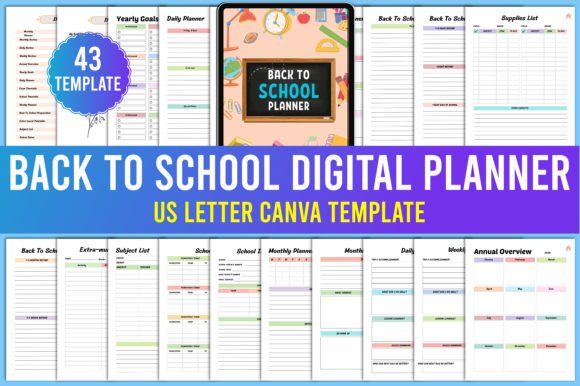
The scope of the Digital Back to School Canva Templates is impressive, covering every conceivable aspect of academic life. It moves beyond basic scheduling into deep organizational territory. The checklist alone is a testament to its thoroughness. You aren't just getting a generic calendar; you are getting specific tools like a Monthly Planner, Daily Review, and an Exam Timetable. For parents, the inclusion of an Extra-mural Timetable, School Parents Meetings log, and a Responsivity tracker (likely intended for responsibility/chores) transforms this from a simple scheduler into a parenting command center. For students or educators, the Study Tracker, Reading List, and Subject List provide the structure needed to manage complex coursework and reading goals.
Customization and Brand Consistency
One of the most significant advantages of using Canva for these templates is the ability to maintain brand identity or personal aesthetic consistency. If you are a blogger, content creator, or small business owner in the education sector, you can easily tweak the color palettes and fonts to match your existing brand identity. This is crucial for anyone who might want to share their planning pages on social media as part of a content strategy. Instead of using a generic third-party planner app that looks like everyone else’s, you can create a cohesive visual experience.
The Design Assets included are versatile. For instance, the Vision Board template allows for a collage-style approach to goal setting, which is perfect for visual thinkers. Meanwhile, the My Journal and Notes sections provide open-ended spaces for reflection. The ability to edit these in Canva means you can utilize Canva’s vast library of stock photography and graphics to embellish your pages, turning a simple planner into a personalized scrapbook or a professional portfolio of your teaching methods.
Practical Applications for Every Audience
While the primary audience is clearly parents and students, the utility of the Digital Back to School Canva Templates extends much further. Consider the entrepreneur or marketer in the education niche. These templates can be repurposed as lead magnets. A school supply store owner could offer a customized version of the Supplies List or Book List as a free download to build an email list. A graphic designer could use the Checklist structure to create client onboarding documents, adapting the "School Preparation" flow to "Client Onboarding Preparation."
For hobbyists and crafters, the Time Table and Daily Routine Tracker can be adapted to manage crafting projects or inventory for an Etsy shop. The My Bucket List and Ideas files offer unstructured space that is perfect for brainstorming new product lines or creative projects. The inclusion of specific reminders—Reminders after bed, Reminders Before school—demonstrates a user-centric design philosophy that understands the rhythm of daily life, not just the logistics of work.
Navigating the Files and Workflow
A critical technical note for anyone downloading these assets involves the workflow. To ensure the original link remains active and uncorrupted, you must make a copy of the document in your own Canva account before starting work. This is a standard best practice for collaborative digital assets, but it is worth emphasizing. Working directly on the shared link can lead to version control issues or accidental deletion of the master template.
The files provided include high-quality PDF Files and JPEG files, alongside the Canva links. This trio of formats ensures maximum flexibility. The PDFs are perfect for the final output—whether you are printing a physical binder or archiving a digital copy. The JPEGs are excellent for quick sharing on mobile devices or embedding into digital notebooks like GoodNotes or Notability. However, the editable Canva links are the core value proposition, allowing for infinite customization.
Design Details and Usability
From a design perspective, the templates strike a balance between functionality and aesthetics. The layout is structured to guide the eye naturally from the macro (Annual Overview, Yearly Goals) to the micro (Daily Planner, To-Do List). This hierarchy is essential for effective planning; it ensures that daily tasks are always connected to larger, long-term objectives. The use of clean lines and ample margins makes these templates highly legible, even when filled with dense information.
For those concerned with readability, the templates utilize standard, web-safe typography that renders well across all devices. There is no reliance on overly decorative or script fonts for body text, which ensures that the planners are functional tools rather than just visual novelties. However, because the templates are editable, users have the freedom to introduce their own font pairing choices. A user might choose to keep the headers in a bold sans serif font for clarity but switch the body text to a softer handwritten font for a more personal touch.
Commercial and Personal Licensing
When working with premium font assets or templates intended for broad use, it is always wise to check the licensing terms. Typically, templates sold on marketplaces come with a license that allows for personal and sometimes limited commercial use—specifically, for the end product created by the buyer. However, reselling the template files themselves (the editable links) is generally prohibited. If you are a small business owner looking to use these templates to create products for resale (e.g., printed planners), ensure you verify the specific license attached to this download to ensure compliance.
In conclusion, the Digital Back to School Canva Templates offer a robust, adaptable, and professional solution for managing the complexities of the academic year. They bridge the gap between digital convenience and the tactile satisfaction of a well-organized planner, making them an indispensable asset for parents, educators, and creative professionals alike.