Create Regal Pet Portraits with Vol.17 Templates
If you’ve ever scrolled through social media and stopped dead in your tracks at a photo of a pug wearing a velvet robe or a tabby cat in a military uniform, you know the power of the "royal pet portrait." It is more than just a funny meme; it has evolved into a legitimate design niche and a lucrative market for creators. Whether you are a photographer looking to expand your offerings, a graphic designer seeking new assets, or a pet owner wanting to immortalize your furry friend, the aesthetic of the noble beast is here to stay. This is where the Royal Pet Portrait Templates Vol.17 comes into play, offering a sophisticated yet accessible way to transform standard pet photography into gallery-worthy art.
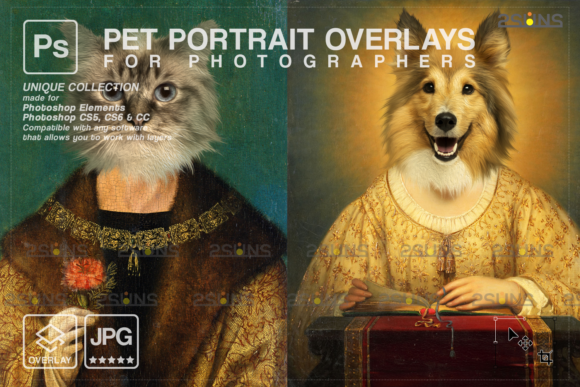
Created by 2SUNS, this volume in the series understands that the magic isn't just in the funny costume—it's in the seamless integration of the animal into a classical setting. This isn't a simple overlay; it is a toolkit designed for creative professionals. The package includes two high-resolution JPG backgrounds and one ABR fur brush file. The backgrounds are rendered at 300 DPI, which is the industry standard for high-quality print production. This ensures that whether you are printing a small 5x7 for a desk or a massive 24x36 canvas for a living room wall, the details remain crisp and the colors vibrant.
Understanding the Aesthetic: More Than Just Costumes
When working with digital assets, the "feel" of the background is just as important as the subject. The Royal Pet Portrait Templates Vol.17 leans heavily into the Baroque and Renaissance styles. We are talking about rich, deep color palettes—think burgundies, royal blues, and burnished golds—coupled with intricate textures that mimic oil paintings. This style provides a sense of gravity and history to the image.
However, the true utility of this set lies in its versatility as a digital pet art asset. It serves as a pet painting background that anchors the subject. If you are a photographer, you know that lighting a pet perfectly against a physical backdrop is expensive and time-consuming. With these templates, you can shoot your subject in a controlled environment with good lighting, cut them out, and drop them into a world of luxury. The included ABR fur brush is a particularly thoughtful addition. Often, when cutting out animals—especially dogs with fluffy coats or cats with wispy fur—the edges can look jagged or "cut out." This brush allows you to paint in realistic fur strands that overlap the background, creating a depth of field and a sense of realism that separates amateur work from professional design.
Practical Applications for Designers and Entrepreneurs
For the creative professional or small business owner, understanding where to deploy these assets is key to maximizing their value. The Royal Pet Portrait Templates Vol.17 is not just for personal scrapbooking; it is a powerful tool for commercial and brand identity projects.
Custom Pet Portraiture Business
The most obvious application is the "side hustle" of custom pet portraits. This is a booming market. By using these templates, you can drastically reduce production time. Instead of painting a background from scratch for every commission, you utilize the digital background royal dog portrait assets provided. This allows you to offer competitive pricing while maintaining high profit margins. The templates are designed to work with Photoshop, Paint Shop Pro, and even PicMonkey, meaning you don't need to be a master digital painter to create a masterpiece.
Greeting Cards and Stationery
In the world of editorial design and packaging design, novelty sells. Imagine a line of birthday pet portrait cards. A customer sends you a photo of their Golden Retriever, and you place it into a Vol.17 background with a crown and a caption like "The King of the Dog Park." This is a high-value product that feels bespoke. The 300 DPI resolution ensures that the text and fine details of the background print perfectly on cardstock.
Social Media Branding
For marketing managers and content creators, standing out in a crowded feed is difficult. A standard photo of a product might get scrolled past, but a photo of the company mascot (or a model's pet) styled as royalty creates an immediate emotional connection and a "thumb-stopping" moment. These social media graphics work exceptionally well for pet influencers, veterinary clinics wanting to show a playful side, or boutique brands looking to add a touch of whimsy to their brand identity.
Technical Workflow and Compatibility
One of the barriers to entry for many aspiring digital artists is software complexity. The Royal Pet Portrait Templates Vol.17 is designed to be accessible. The file size is a manageable 3 MB zip archive, making it quick to download and easy to store.
The compatibility is broad. It works seamlessly with industry giants like Adobe Photoshop and Photoshop Elements, but it also supports open-source or simplified editors like Paint Shop Pro and PicMonkey's Photo Editor. This is crucial for hobbyists or small business owners who may not have the budget for a full Adobe Creative Cloud subscription.
A Note for Lightroom Users: While Lightroom is excellent for color grading and basic adjustments, it is not a layer-based editor by default. To use these templates effectively, you will need a plugin that supports layers, or you will need to round-trip your images to Photoshop. The templates rely on the ability to stack the pet image on top of the background and use the fur brush on a separate layer.
Design Tips for a Cohesive Look
To get the most out of this premium font (in this context, think of the template as a "type" of visual language), you need to pay attention to the details of integration. Here are a few professional recommendations:
- Color Matching: Even though the backgrounds are rich, you may need to color correct your pet's fur to match the lighting of the scene. If the background implies warm candlelight, ensure your pet doesn't look like they were photographed in cool, blue fluorescent office light. Use "Curves" or "Color Balance" adjustment layers to unify the image.
- Shadow and Depth: A common mistake is placing the pet flatly onto the background. To make the digital pet art look real, you must add shadows. Paint a soft, dark shadow beneath the paws and a cast shadow on the floor of the background. This "grounds" the subject.
- Texture Overlays: To truly sell the illusion that this is a pet painting and not a photo composite, consider adding a canvas texture overlay on top of your final image. This blends the pixels of the photo with the painted background, creating a cohesive artistic style.
Why This Style Endures
The popularity of the royal dog portrait isn't fading because it taps into a universal truth: we view our pets as family members, often deserving of the same status as royalty. For designers and entrepreneurs, the Royal Pet Portrait Templates Vol.17 provides a turnkey solution to meet this demand. It eliminates the need for expensive props and studio time, replacing them with a versatile, high-resolution digital toolkit. Whether you are creating a birthday pet portrait for a client or designing a unique series of prints for an Etsy shop, these assets offer the perfect blend of classical elegance and modern workflow efficiency. It is a practical investment in your creative toolkit that yields results clients are willing to pay for. Enjoy the process, and have fun bringing these noble beasts to life.