Stop Designing From Scratch: The Business Flyer Template That Works
If you have ever sat in front of a blank artboard trying to figure out how to fit a headline, three bullet points, and a call to action onto a single sheet of paper without it looking cluttered, you know the frustration of graphic design from scratch. It is not just about creativity; it is about spatial math, typography hierarchy, and print specifications. For entrepreneurs, small business owners, and busy marketers, the goal is rarely to win an art award—it is to get a message into the hands of potential customers effectively. This is where the concept of "Flyer Design Templates" shifts from a shortcut to a strategic asset.
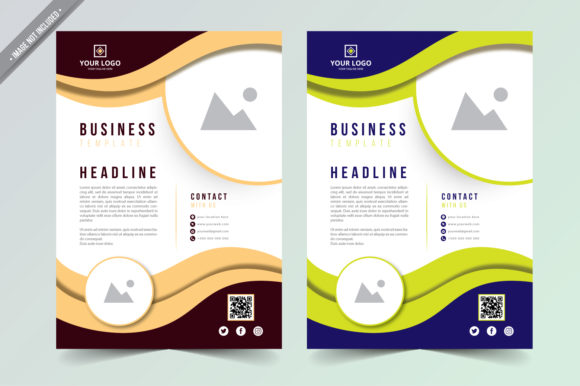
This specific Business Flyer template is built for the reality of modern marketing. It is not a flimsy JPEG or a locked PDF; it is a complete, professional-grade asset ready for Adobe Illustrator and Adobe Photoshop. The core value here is the combination of professional structure and total flexibility. You are starting with a layout that has already solved the problem of visual balance. The negative space is managed, the typography is sized for readability, and the visual flow guides the eye naturally from the headline to the details. However, because it is a complete vector design, it acts as a skeleton rather than a cage. You are not just filling in the blanks; you are customizing a high-performance vehicle.
The Anatomy of a Professional Print Asset
When we talk about premium font usage and professional templates, we are talking about the technical details that separate amateur flyers from professional marketing collateral. This template includes AI and EPS files, which means you are working with vector paths. Why does this matter? Because vectors are scalable. If you decide halfway through your project that you need to turn this A4 flyer into a massive trade show banner, the design will not pixelate. The lines will remain crisp, and the text will remain sharp.
The technical specifications are tuned for commercial printing. The template is set to A4 size (21 × 29.7 cm), but crucially, it includes a 2mm bleed. If you have ever received a print job with white strips along the edges because the printer cut the paper slightly off-center, you know why bleed is non-negotiable. This template accounts for that margin of error, ensuring your design looks clean right to the edge of the paper.
Furthermore, the file is delivered at 300 DPI. This is the standard for high-quality print. Anything lower often results in fuzzy text or blurry images when printed on a standard laser or offset printer. The layers are fully organized, meaning you will not have to dig through a chaotic "Layer 1, Layer 2, Layer 3" mess to find the background color. For those using Adobe Photoshop, the integration of Smart Objects allows you to replace images with a simple drag-and-drop, automatically applying the correct perspective and lighting effects defined by the template.
Typography and Hierarchy: The Silent Salesmen
A flyer has about three seconds to grab attention before it is tossed into the recycling bin or scrolled past. The success of those three seconds relies entirely on visual hierarchy. This Business Flyer template utilizes a sans serif font approach that leans toward modern typography. Sans serif fonts are generally easier to read at a glance and convey a sense of efficiency and modernity, which is ideal for B2B or service-based businesses.
Because the text is fully editable via the Text Tool, you have the power to adjust the hierarchy to match your specific value proposition. For example, if your business relies on a personal touch, you might swap the secondary font for a script font or handwritten font to add a layer of warmth. This is the art of font pairing. The template provides a strong baseline, but you can experiment with contrast—pairing a bold, blocky header with a lighter, airy body text—to create a rhythm that is pleasing to the eye.
Remember, the goal of modern typography in marketing is clarity. Whether you are designing for editorial design, packaging design, or a simple handout, the typeface must be legible. This template uses free fonts, meaning you will not have to pay for additional licensing to get the exact look shown in the preview. This is a massive advantage for small businesses watching their overhead costs.
Practical Application: Beyond the Standard Flyer
While the file is optimized for a standard A4 print, the utility of these design assets extends far beyond a paper handout. Because the design is clean and scalable, it serves as a foundation for a cohesive brand identity.
Consider the digital space. You can easily resize this template for social media graphics. An A4 flyer is tall, but you can crop the top section—perhaps just the logo and the main headline—to create an Instagram Story or a Pinterest pin. You can export the details section as a graphic for a LinkedIn post. By using the same color palette and typeface across your print and digital channels, you reinforce brand recognition.
For web design, the color codes and font choices used in the flyer can be translated directly to your website’s CSS. This ensures that a customer picking up a flyer at a coffee shop sees the exact same visual language when they visit your URL later. This consistency builds trust. It signals that your business is organized and attentive to detail.
Even for logo design concepts, this template can act as a mockup. If you are a designer pitching a rebrand to a client, showing the new logo in context—on a business flyer—is far more powerful than showing it on a white background. It allows the client to visualize the creative font and color palette in a real-world scenario.
Customization: Making the Template Your Own
The biggest risk with using flyer design templates is looking generic. If you simply drop your logo onto the file and change the phone number, it might look "fine," but it won't stand out. To truly leverage this asset, you need to engage with the customization features.
Start with the color palette. The template is likely set to a specific mood—perhaps corporate blue or energetic orange. Look at your existing brand colors. Do not just change the main header; look at the secondary elements. The background textures, the icon colors, and the button fills should all align with your brand identity.
Next, look at the imagery. The note that "Images are NOT included" is actually a feature, not a bug. Stock photos included in templates are often overused. By using the Smart Objects in Photoshop or the clipping masks in Illustrator, you can insert high-resolution photos of your actual products, your team, or your workspace. This authenticity is what converts a viewer into a customer. A generic handshake stock photo feels cold; a photo of your actual team smiling feels welcoming.
Finally, review the copy. Graphic design is the vessel, but the words are the cargo. Do not just paste your old mission statement. Write punchy, benefit-driven copy. Use the bullet points provided in the layout to highlight your top three selling points. Keep the "Call to Action" (CTA) clear. Whether it is "Visit our website," "Call for a free quote," or "Scan the QR code," make sure the CTA is the most prominent element in the bottom third of the flyer.
Conclusion: Efficiency Meets Professionalism
In the world of commercial fonts and design assets, time is money. Spending hours kerning text and aligning boxes is a luxury that most business owners cannot afford. This Business Flyer template bridges the gap between professional design standards and the need for speed. It offers a scalable, organized, and print-ready foundation that respects the technical requirements of the printing world while offering the creative freedom of a blank canvas. By treating this template not as a finished product but as a starting point for your font pairing, color theory, and authentic imagery, you create a marketing tool that looks like it cost a fortune, but only cost you the time it took to customize it.